Your words, made into audio
A custom subliminal maker combines a spoken affirmation track with a background sound. You decide what the words say and how the mix sounds. In Sublime, you can write personalized affirmations or start with suggestions, then record your own voice or create speech from text.
This is useful when a generic recording does not match your intentions or language. A session about speaking up at work can use your own examples and phrasing. A self-love session can focus on boundaries or rest rather than someone else’s idea of success.
How to create your own subliminals
Choose a specific intention
Start with one theme, such as confidence in conversations. A focused intention makes it easier to choose a short, coherent set of affirmations.
Choose and review your affirmations
Write your own words or explore the app’s suggestions. Read every line before generating audio. Replace any statement that feels unrealistic or uncomfortable.
Choose a voice and background
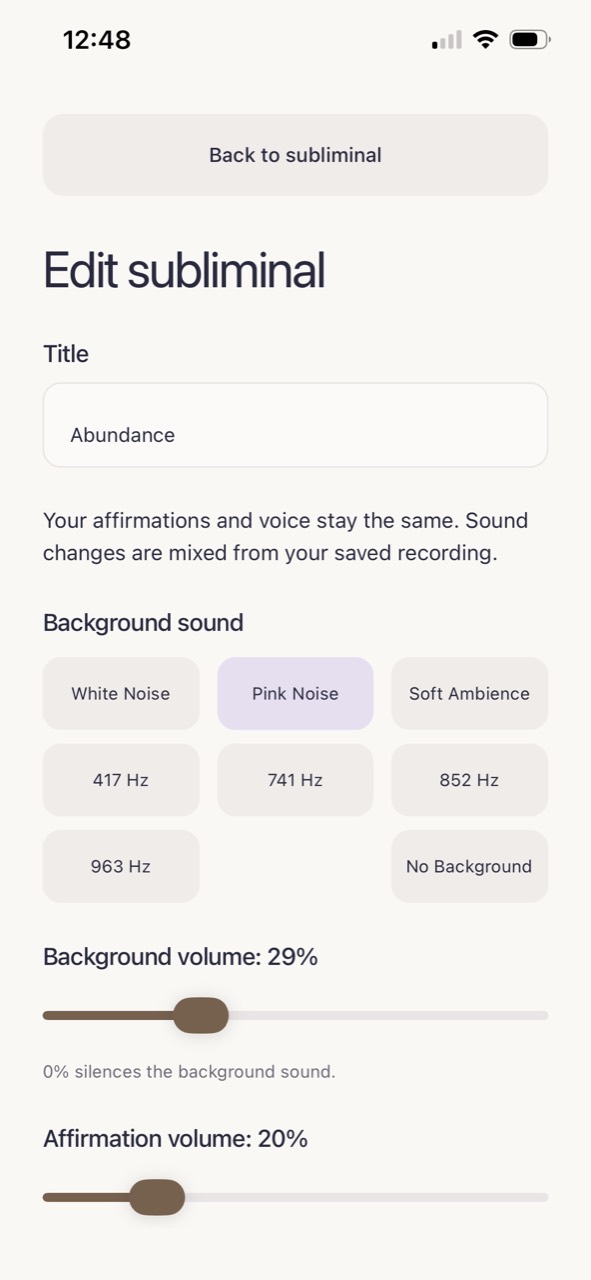
Record yourself reading the affirmations, or choose text to speech. Select a sound such as white noise, pink noise, or soft ambience. No background is also an option.
Set your mix and listening duration
Adjust affirmation and background volume separately. Choose speed, layers, and duration, then create your session and listen. Start with a simple mix so you can judge whether you enjoy it.
Audio customization without a separate editing workflow
Manually assembling affirmation audio can mean recording in one app, importing a file into an editor, adding another audio track, balancing the levels, and extending the session. Sublime puts those choices in one creation flow and saves your creations in a personal library.
You can adjust your audio without treating faster speech or more layers as a promise of better results. Speed changes how the affirmations sound; layers play voice audio together. Choose settings for listening comfort rather than a supposed formula for effectiveness.
Choose a session that fits your life
Use a custom session as a reminder before a presentation, during a quiet break, or as part of an evening routine. Your mix does not have to be completely inaudible to be meaningful to you. If you prefer to hear each word, keep the voice clear or explore our affirmation recorder.
New to the topic? Our guide to what subliminals are explains the distinction between low-volume audio and scientifically tested subliminal perception.
Questions, answered.
Can I make subliminals on my iPhone?
Yes. Sublime lets you choose affirmations, record or generate a voice track, combine it with background sound, and choose listening settings on iPhone. Custom subliminal use requires a subscription.
Can I choose the affirmation volume separately?
Yes. The editor has separate controls for background volume and affirmation volume, plus a no-background option.
Does quieter audio work better?
There is no established volume setting that guarantees personal change. Choose a comfortable mix. Lowering a voice beneath music does not by itself prove that it is processed unconsciously.